
 Polski


 Contact
 ul. Słowackiego 8
 sklep@katemedia.pl
 +48 570 025 000


There are no more items in your cart
JCID Drawing Online 1 Year License - Motherboard Schematics and PCB Maps
JCID Drawing Online 1 Year License - Motherboard Schematics and PCB Maps
JCID Drawing • 12-month license
JCID Drawing is professional software for mobile repair shops, providing access to electronic schematics, 1:1 motherboard bitmaps, HD vector diagrams, and PCB layer maps. It facilitates component location, connection analysis, and electronic fault diagnostics.
Access to measurement data, repair documentation, and select service functions. License valid for 1 year. Additional JCID hardware is not included with the product.
zł299.99
Tax included
Product availability
Last remaining items
Delivery options
Learn more
PROFESSIONAL REPAIR SOFTWARE
JCID Drawing
JCID Drawing
Motherboard Schematics
& Diagnostics
JCID Drawing is advanced software designed for professional mobile phone repair services and electronics technicians.
Access electronic schematics, detailed motherboard layouts, vector diagrams, PCB layer documentation and diagnostic data to help locate components, trace connections and identify faults.
JCID ONLINE LICENSE
12
MONTHS OF ACCESS
An annual license providing access to JCID Drawing software and its available technical documentation and repair resources.
A professional solution designed
for electronics diagnostics
and motherboard repair.
1:1 Bitmap
Detailed component layouts
PCB Schematics
Electronic circuit analysis
Measurement Data
Reference values
12 Months
Annual license
JCID INTELLIGENT DRAWING
Professional Software for Motherboard Diagnostics
JCID Drawing is a comprehensive software solution for analyzing the structure and electronic connections of mobile phone motherboards and selected tablets.
The software combines detailed electronic schematics with graphical component layouts. It helps technicians locate integrated circuits, capacitors, resistors, coils, FPC connectors and other electronic components on the motherboard.
By combining technical documentation with PCB visualizations, technicians can analyze power lines, signal paths and electrical connections between individual components. This helps diagnose short circuits, broken traces, damaged solder pads and other electronic faults.
SOFTWARE FEATURES
Key Features of JCID Drawing
Advanced tools designed to support the daily work of electronics repair professionals.
01
1:1 Bitmap Layouts
Detailed motherboard maps for accurately locating individual electronic components.
02
Vector Diagrams
High-resolution component visualizations with convenient zooming capabilities.
03
PCB Layer Maps
Analyze the routing of traces and connections across different motherboard layers.
04
Electronic Schematics
Access circuit documentation, signal lines and connections between electronic components.
05
Resistance Data
Reference measurement values for comparing results during diagnostics.
06
Repair Notes
Save useful information about components, measurements and electronic faults.
07
Repair Cases
Access materials describing real repair cases and diagnostic procedures.
08
Personal Cloud Database
Store your own voltage and resistance measurements in a personal database.
09
Extensive Documentation
Access schematics and technical documentation for many mobile devices.
DETAILED PCB ANALYSIS
1:1 Bitmap, Vector Rendering & PCB Layer Maps
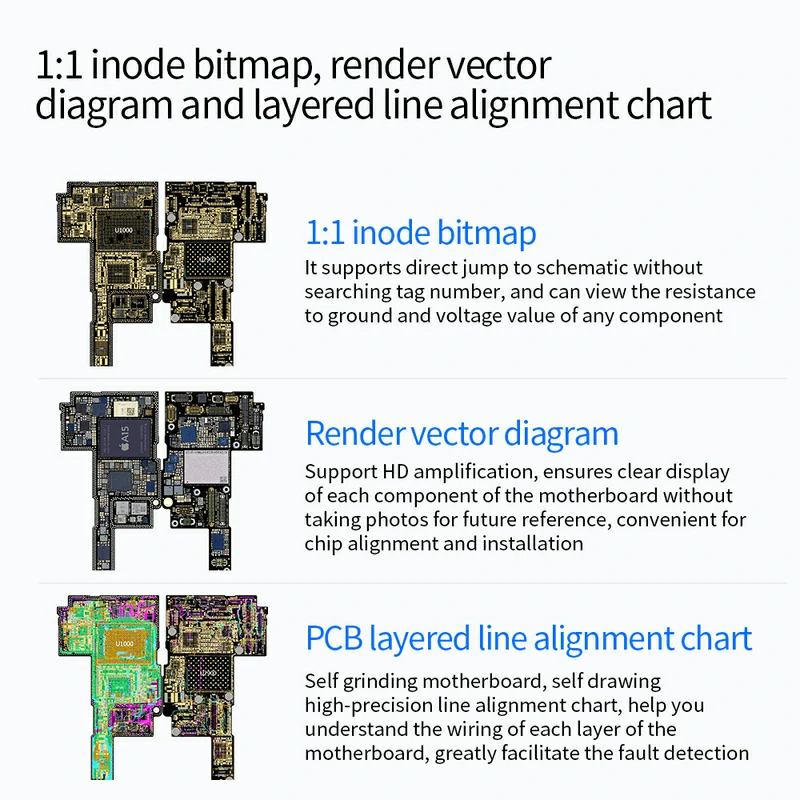
JCID Drawing provides different motherboard visualization modes to help technicians identify components and understand electronic connections.
- 1:1 inode Bitmap – locate individual components, navigate directly to schematics and view available resistance and voltage data.
- HD Vector Rendering – provides a clear and detailed view of motherboard components, making precise positioning and installation easier.
- PCB Layer Maps – trace electrical connections through individual layers of multilayer motherboards.
- Connection Analysis – identify electrical relationships between components within a selected circuit.
These features are particularly useful for diagnosing short circuits, rebuilding damaged connections and repairing liquid-damaged devices.
ADVANCED DIAGNOSTICS
Measurement Data, Resistance & Voltage
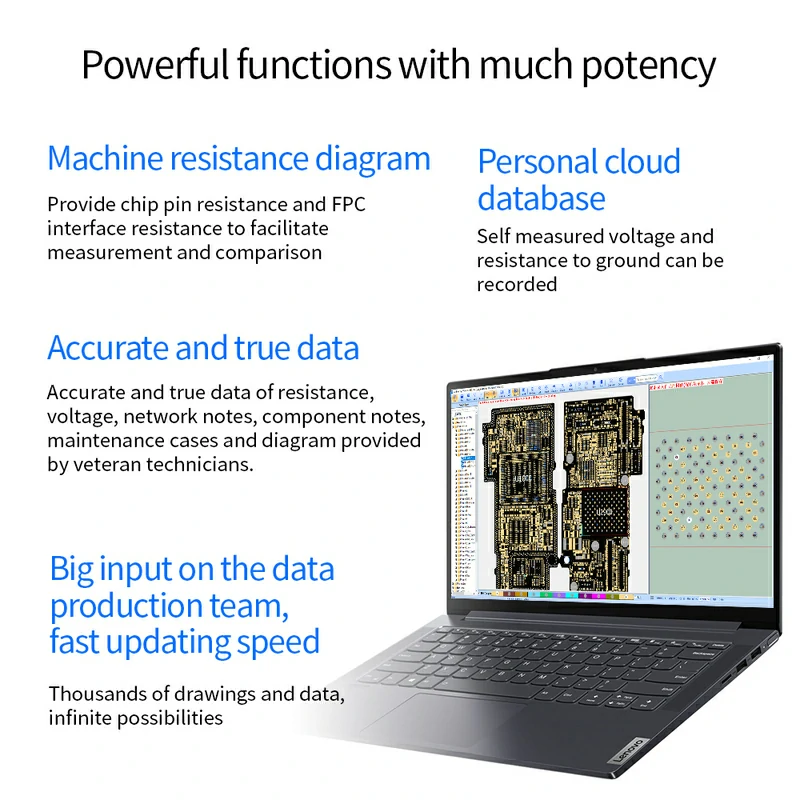
One of the important features of JCID Drawing is access to reference data that helps technicians diagnose electronic faults.
The software provides information about resistance values of selected IC pins, FPC interfaces and available voltage references.
- IC pin resistance values.
- Diagnostic information for FPC connectors.
- Reference voltage and resistance values.
- Information about components and signal lines.
- The ability to save your own measurements.
- Technical documentation prepared by experienced technicians.
This information allows technicians to compare their own measurements with available reference values and narrow down the possible source of a fault.
How Does JCID Drawing Support Phone Diagnostics?
An example diagnostic workflow for a phone that does not power on or has an abnormal power supply circuit.
01
Select a Model
Open the technical documentation for the device.
02
Find the Circuit
Analyze the schematic of the relevant circuit.
03
Locate Components
Find the component on the motherboard map.
04
Take Measurements
Check voltage or resistance using suitable equipment.
05
Compare Results
Use available reference values for analysis.
Important:
JCID Drawing is a diagnostic
support tool. The software
does not independently perform
electrical measurements or
repair devices. Appropriate
service equipment and technical
knowledge are required.
HARDWARE INTEGRATION
JCID Drawing Compatibility with Repair Equipment
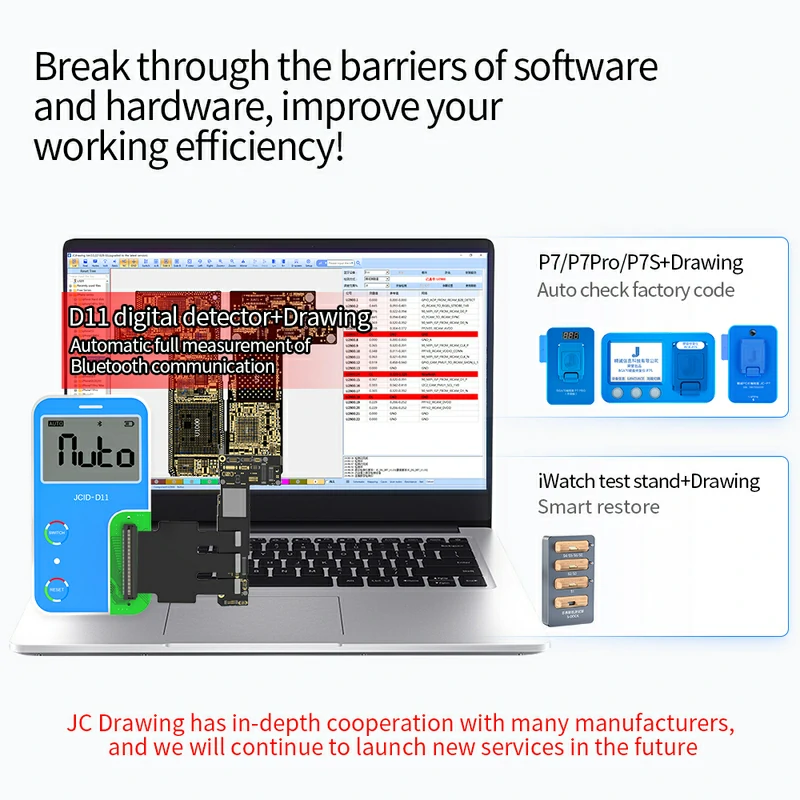
JCID Drawing can be used to browse schematics, PCB maps and technical documentation without an additional programmer.
The manufacturer also provides integration with selected diagnostic devices, which may extend the software's capabilities.
- JCID D11 – integration with compatible measurement equipment.
- JCID P7 / P7 Pro / P7S – support for selected service-related functions.
- Compatible Test Fixtures and Accessories – integration with selected repair equipment.
The availability of specific functions depends on the connected hardware, software version and supported device model.
Note:
The diagnostic equipment shown
in the illustration is for
demonstration purposes only
and is not included
with this license.

TECHNICAL DOCUMENTATION
Extensive Schematic Database & Continuous Development
JCID Drawing provides access to an extensive database of electronic schematics and technical documentation for many mobile phones and selected tablets.
The software includes documentation for Apple devices and selected Android smartphones. The availability of specific materials depends on the device model.
- Extensive library of schematics and PCB layout maps.
- Database updates and ongoing development.
- Technical information and materials prepared by experienced technicians.
- Examples of real-world repair cases.
- Options for sharing technical knowledge.
- Selected community features and manufacturer support.
Not every device model includes the same range of schematics, PCB maps and reference data.
PRODUCT SPECIFICATIONS
JCID Online – 1 Year License
Software
JCID Drawing
Product Type
Software License
License Duration
12 Months
Application
Electronics Diagnostics
Intended Users
Professional Phone Repair Services
Documentation
Schematics & PCB Maps
Product Reference
SJCIDVCARD
This product includes a software license only. Programmers, measuring devices and other repair tools shown in the images are not included.
INSTALLATION & ACTIVATION
How to Get Started with JCID Drawing
-
1
Download the Software
Download the latest installer from the official JCID website.
-
2
Install the Program
Run the appropriate installer for your supported operating system.
-
3
Sign In to Your Account
Register a new JCID account or sign in with an existing one.
-
4
Activate Your License
Open the account activation or renewal section and enter the required license credentials.
-
5
Start Using JCID Drawing
Select your device model and access the available technical documentation.
Frequently Asked Questions
Does JCID Drawing require a JCID programmer?
No. A separate programmer is not required for basic schematic and motherboard map viewing. Certain additional functions may require compatible hardware.
How long is the license valid?
The license provides access for 12 months. After the license expires, continued access to paid resources may require renewal.
Does JCID Drawing support Android phones?
Yes. The JCID Drawing database also includes selected Android smartphones. The availability of technical documentation depends on the specific device model.
Does JCID Drawing provide resistance values?
The software provides selected reference data, including resistance values and technical information about electronic components. The range of available data may vary between device models.
Can JCID Drawing automatically repair a phone?
No. JCID Drawing is a diagnostic support application. It provides schematics, PCB maps and technical information, but does not replace measurement equipment or the work of a repair technician.
Is the JCID hardware shown in the images included?
No. This product includes the software license only. Measurement devices, programmers and other accessories shown in the illustrations are not included.
Information:
The availability of specific
features, schematics and
supported device models
may change with future
JCID Drawing updates.
JCID DRAWING / KATEMEDIA
Professional Motherboard Diagnostics in One Software Solution
JCID Drawing combines electronic schematics, 1:1 bitmap layouts, vector diagrams, multilayer PCB maps, measurement data and technical documentation in a single application.
An advanced tool for mobile phone repair professionals who need detailed technical information when diagnosing and repairing electronic components and motherboards.
SJCIDVCARD
1
Item
No customer reviews for the moment.
You need to be logged in or create an account to give your appreciation of a review.